
Meetings that book themselves, with context.
The customer picks a time the rep actually has free. Meetings, reminders and sales visits all live in the same calendar.
The calendar you book this demo with is this very module, running.
Four views and one drag to reschedule.
Drag the event to another time or another day and it is rescheduled. It snaps to 30-minute blocks on its own.
The whole month at a glance, with each event in its color and the badge for where it came from. Good for workload, not for detail.
Every event takes a reminder 5, 15, 30 or 60 minutes before, or 1 day before.
Four sources, one calendar.
Every event shows where it came from. The source filter lets you see everything, only the CRM or only Google.
CRM events
Meetings created inside the system, linked to the lead with its phone number, its email and the channel it came in through.
Google Calendar
Each rep connects their own account. The sync runs both ways and every event sets its destination: CRM only, Google only or both.
Reminders
Follow-up tasks linked to a lead or to an opportunity show up in the same calendar, with their priority.
Sales visits
Sales visits, with start and end time, the quote attached and the products discussed, sit next to the rest of the calendar.
If Google stops responding, the calendar does not break: it marks the account as disconnected and keeps working with the CRM events.
See Leads and customer baseCustomers book without signing up or messaging anyone.
A public link that respects the time the rep actually has free. Single-use or permanent, with a configurable expiry date.
- 01
You set your availability
Hours per day, internal blocks, time off, default duration and buffer between meetings. The link only offers what is left open.
- 02
You send the link from the chat
One click inside the conversation and the link goes out pre-loaded in the message, without leaving the inbox.
- Distribuidora del CentroMeeting with Lucía Ferrer · 30 minutesPick a dayTue12Wed13Thu14Fri15Available times09:0009:3011:0015:3016:0017:30What the meeting is aboutI want to see prices for the wholesale line.Confirm booking
- 03
The customer picks a day and a time
A page of your own with your company's logo, durations of 30 minutes, 1 hour, 1 hour 15 or 1 hour 30, and a field to write what it is about.
- 04
It is confirmed and added to their calendar
A confirmation screen with buttons for Google Calendar, Outlook and an .ics file download for Apple.
- Booking confirmedWednesday, May 13, 11:00 · 30 minutesWith Lucía Ferrer · Distribuidora del CentroAdd to Google CalendarOutlookDownload .icsCancel this booking
- 05
They can cancel without writing to you
The customer gets their own cancellation link, with an optional reason. The time slot goes back to being available.
Links can be single-use or permanent, with a booking counter and an expiry date.
The booking window starts at 45 days and extends further if the rep set a longer horizon.
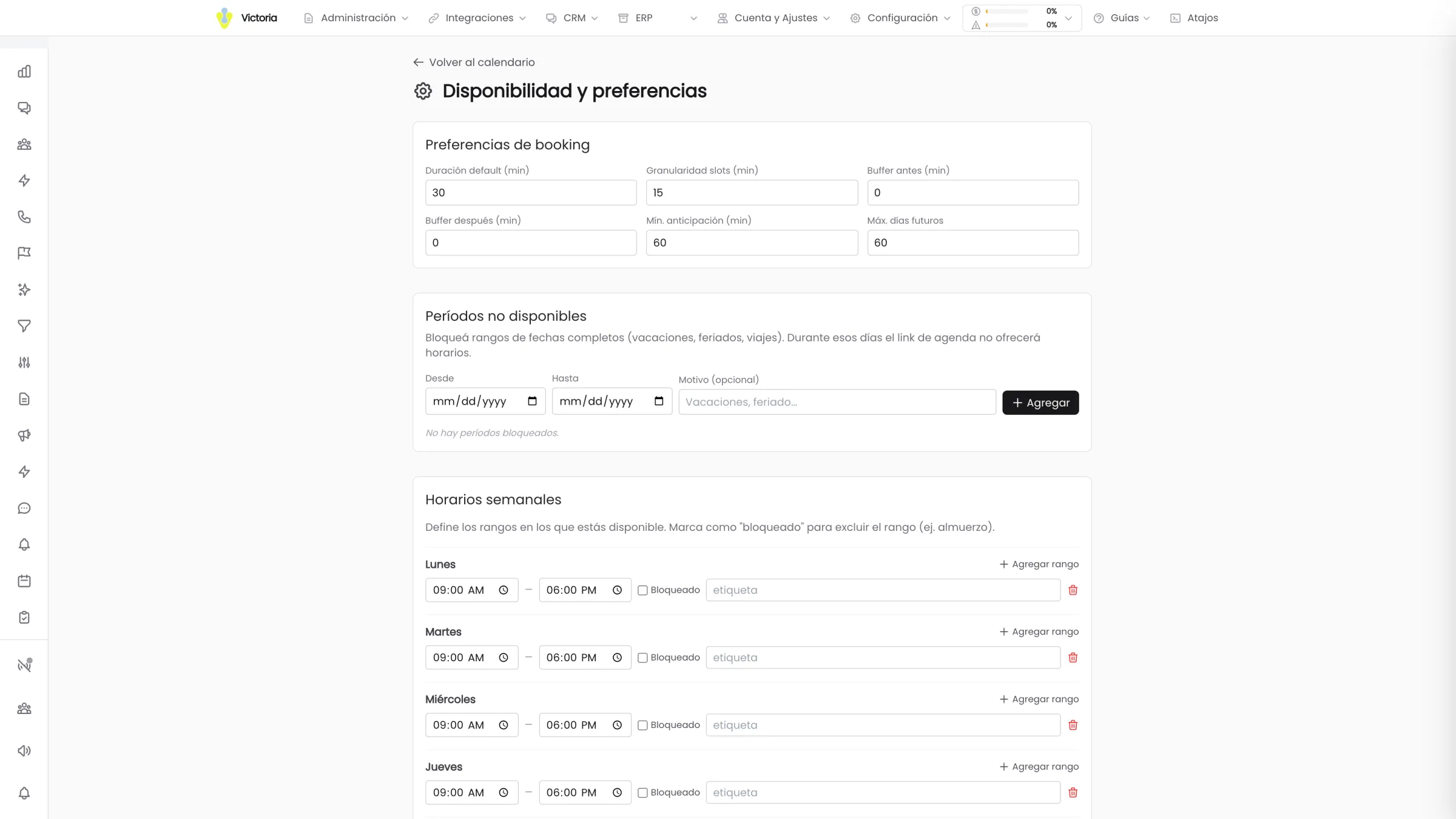
Time windows per day and internal blocks
Several time windows per day and blocks inside the day, such as lunch. The public grid is built from what is left.
Unavailable periods
Vacations and public holidays are loaded as a full period. During those days the link offers no times at all.
Buffer, notice and horizon
Free time before and after each meeting, minimum notice to book and how far ahead the customer can schedule.
Events with commercial context
Every meeting is linked to the lead: phone, email, source channel, team participants, internal notes and attachments. The rep arrives knowing what it is about.
Calendars shared between colleagues
A calendar is shared with view-only or view-and-edit permission. Supervisors see the events and reminders of the whole team.
Reminders in four tabs
Today, Pending, Overdue and Completed, with high, medium or low priority and a link to the lead and the opportunity. When one is rescheduled, the new one is created keeping the lead, the owner and the priority, and the original stays as history.
Event recurrence has five options: daily, weekly, Monday to Friday, monthly and no repeat.
This calendar is the product.
The booking on this page is not a demo built for the website. It is the Victoria CRM calendar module running on the real availability of our sales team.
Pick a time and you will get the confirmation with the buttons to add it to Google, to Outlook or download it as .ics. It is exactly what your customers will see.
If the calendar does not load, message us on WhatsApp and we will set it up anyway.
What happens before and after the meeting.
You have seen how your customer books.
In the demo we set up availability, generate a link and test it against your real operation. 30 minutes.
Victoria CRM · Software built by Victoria AI · Córdoba, Argentina.