
Describe the workflow in plain English and it gets built.
A visual editor, creation by natural language and a simulator that tests every branch of the workflow without sending anything to any customer.
24 triggers · Messaging, AI, lead, sales and flow control actions · A time window per workflow
Tell me what you want to happen and I will prepare the workflow.
If a new lead comes in on the wholesale number and does not reply within 2 hours, send them the follow-up template and notify their rep.
- The customer does not reply within 2 hoursFlow control
- Send WhatsApp: follow-up templateMessagingNew
- Notify the rep for that leadInternal notificationNew
Automating is scary, and rightly so.
It depends on somebody technical, it cannot be tested beforehand, and when something goes wrong the error shows up on the customer side.
Build it, test it, measure it.
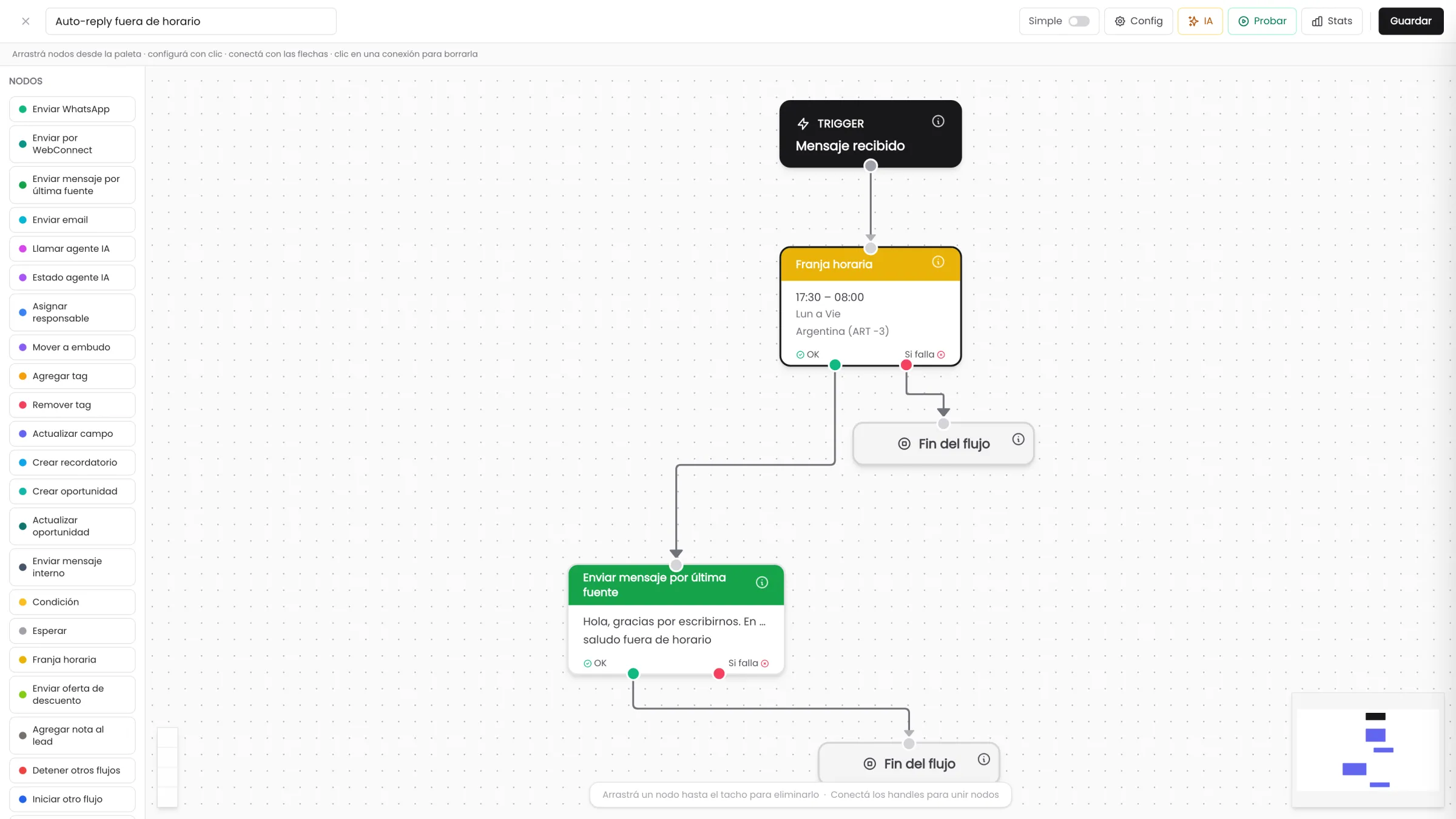
You drag the node onto the canvas and connect it with a line. Zoom, minimap, inserting a node in the middle of an existing connection, duplicating and deleting by dragging.
Ready-made templates are cloned with one click and are always created inactive, as drafts, so they can be reviewed before being turned on.
- 24triggers available
- 7action categories
- 2simulator views
What triggers it and what it can do.
Almost every trigger filters by contact source and even by instance: one specific WhatsApp number, one specific connection, one specific account.
Lead8
- New lead created
- Lead assigned or reassigned
- Lead inactive for X days
- Lead recycled for inactivity
- Lead birthday
- Tag added
- Tag removed
- Custom field modified
Conversation6
- Message received
- The customer does not reply within X time
- The team does not reply within X time
- File received
- Missed call
- Negative sentiment detected
Funnel and opportunities6
- Funnel or stage change
- Opportunity created
- Opportunity modified
- Opportunity due soon
- Opportunity won
- Opportunity lost
Sales and time4
- Reminder overdue
- Time window opens
- Recurring customer enters their repurchase window
- Purchase recorded
The "+ Data" button inserts the name, the phone, the email, the current date and time or any custom field at the exact cursor position.
Automatic does not mean without rules.
The workflow runs when it should, talks to the customer when it should, and is fired by whoever should fire it.
Every run is logged with its outcome, the conditions it evaluated and the reason for the error in plain language.
Living alongside the AI
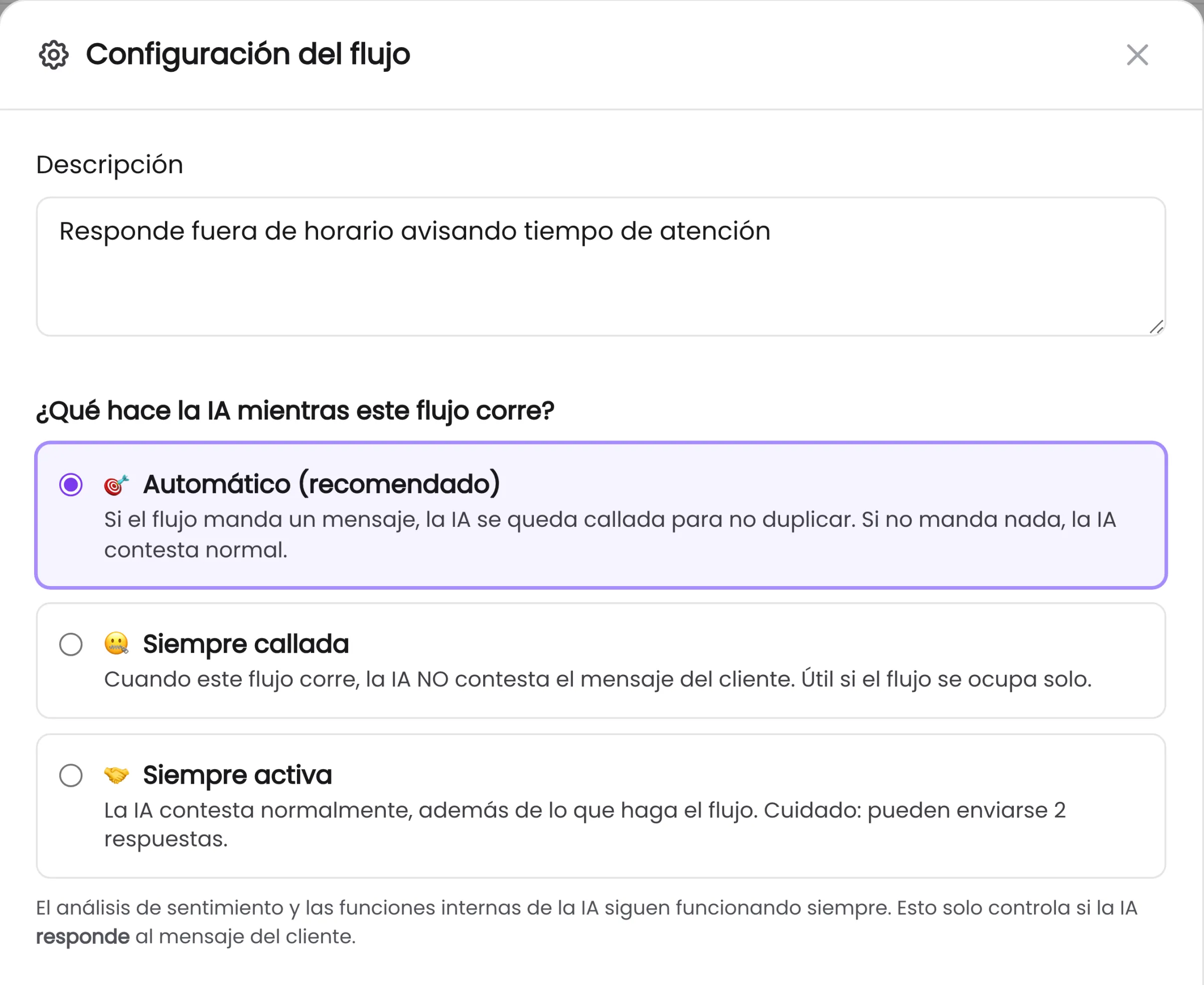
Per workflow you choose whether the AI stays quiet while the workflow writes, whether it does not reply for the whole run, or whether it replies anyway. The system coordinates who talks to the customer.
Execution time window
Hours, days of the week and time zone, with 10 time zones supported. The workflow does not send messages at three in the morning.
Simple mode and advanced mode
Simple mode hides the technical actions for business users. Advanced leaves everything on show.
Manual execution from the chat
You define which users can fire each workflow by hand on one specific lead, without waiting for the trigger.
Ready-made templates
They are cloned with one click and are born inactive, as drafts: they are reviewed and only then turned on.
Success and error branches
Every action has its green branch and its red branch, connectable separately. You decide what happens when something goes wrong.
What gets checked in the first demo.
No workflow is left hanging
Time waits have a hard cap of 30 days and event waits carry a mandatory timeout, 24 hours by default.
Webhooks require HTTPS
An address starting with http:// is blocked, with a warning that the customer data would travel unencrypted.
It does not fire at the whole base
The time window trigger requires at least one lead filter: stage, tag or source.
You know what breaks, and how much
A recent failure counter per workflow, with a window of 24 hours, 7, 30 or 90 days, and the option to clear the failure history.
The statistics live on the canvas
Each node shows how many runs went through it, the conversion rate and the most frequent failure reason.
The error reads in plain language
The history shows the condition evaluated, the expected value, the real value and what each action returned.
The module that comes next.
We build your first workflow in the demo.
You tell us about a follow-up somebody does by hand today, we describe it in plain English and we test it in the simulator right there.
The simulator sends nothing to any real customer.