
Skip to content
Victoria AI
Assistant for sales reps

The copilot for the sales team.

The AI inside the CRM that drafts, quotes, summarises and builds reports. Your rep decides and closes; the system work is done by the assistant.

It runs inside Victoria CRM · Available depending on the plan you have

The problem

Sales reps sell less because they enter more data.

Seven tasks that eat up the sales team hours and not one of them is selling.

Writing the same thing every day

The rep rewrites the same answers, with different wording and a different criterion every time. The quality of the service depends on who replied and at what time.

The assistant solves it:

An AI suggested reply over the customer message, inline autocomplete while typing and templates generated with AI.
Building the quote in another tool

To quote, you have to leave the chat, open a spreadsheet, find the right price list and come back. By the time the quote is ready, the customer has gone cold.

The assistant solves it:

A quote builder inside the chat, with the real catalog and the price list that matches that customer.

Picking a customer back up without knowing what happened

Before calling, the rep reads 200 messages back or calls with no context. When a lead is reassigned, the history is lost in practice.

The assistant solves it:

An AI lead summary: what they asked for, where it was left and what the next step is, in one paragraph.

Asking someone for a number

To find out how the month is going, the rep asks the manager for a report and the manager asks IT. Nobody looks at the numbers in time.

The assistant solves it:

Reports requested in plain language and a target meter always visible in the CRM top bar.

Finding out whether there is stock, and in which branch

The rep calls the warehouse or opens the ERP to find out whether the item is there, what price it ended up at and which branch has it. Meanwhile the customer waits on the other side.

The assistant solves it:

Price and stock lookup per branch from the same chat, against your system and on the spot.

Issuing the document in another system

Once the sale is closed, you have to go into the management system, enter the same data again and issue the document. The work is duplicated and typing errors creep in.

The assistant solves it:

Documents created from the CRM, with the data from the conversation already loaded.

Going out on the road without the system

On a visit the rep does not have the customer account statement at hand, or what they bought last time, or how much they owe. They go back to the office to enter what they did.

The assistant solves it:

A visit schedule in the CRM and lookups on WhatsApp: account status, balance, purchase history and customer summary, without opening a computer.

In the conversation

AI writes the draft. The rep decides what gets sent.

Four aids inside the CRM message composer itself. None of them sends a message on its own.

app.victoriassistant.com
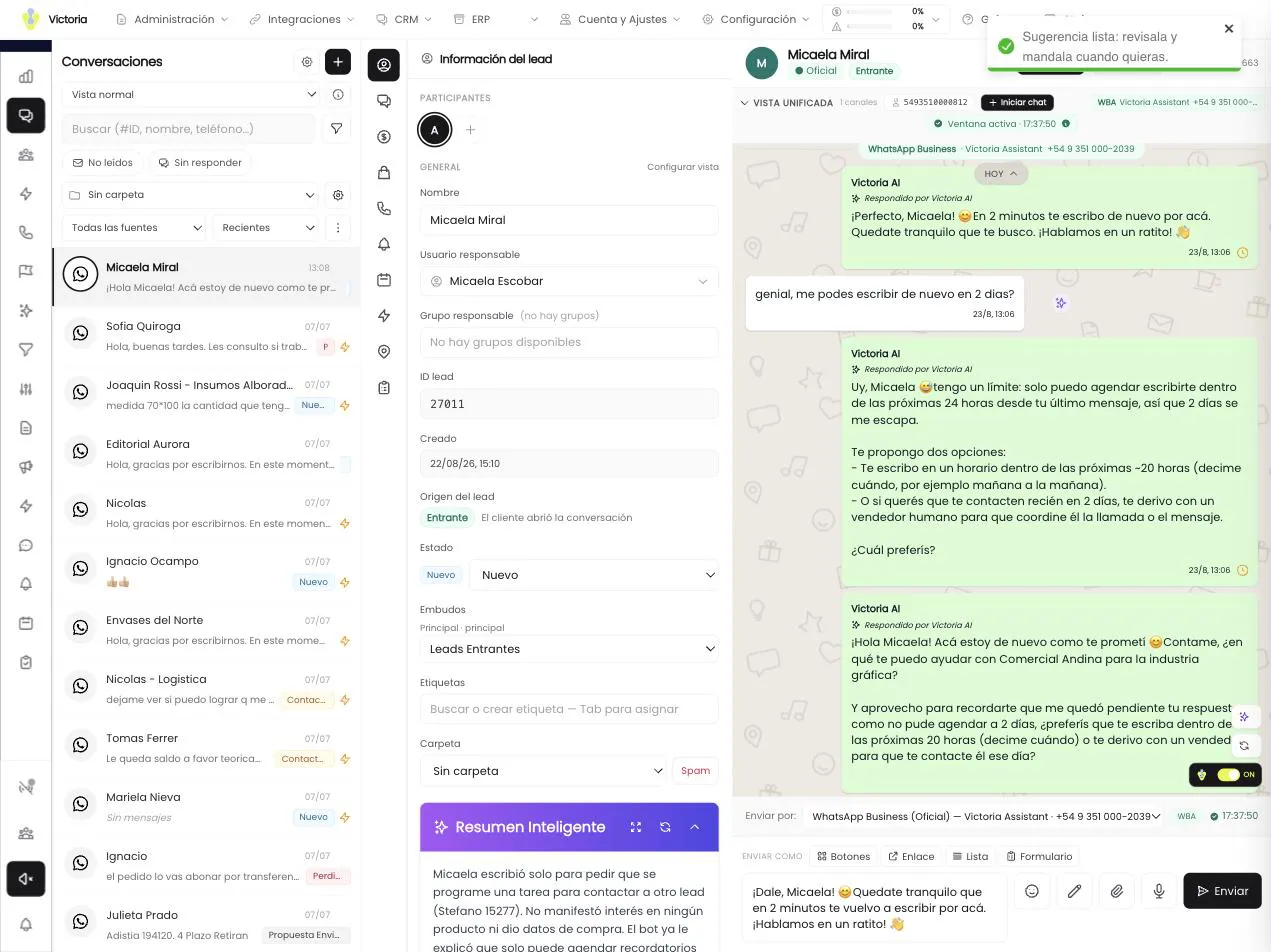
Victoria CRM: the customer thread with the draft the AI wrote loaded into the message field, still unsent

Over any customer message, the assistant writes a draft with the context of the conversation. It is left written in the text field, unsent.

  • It is edited before sending
  • It uses the full customer history
  • Sending is always a human action
Quote builder

From “how much is it” to the PDF sent, without leaving the chat.

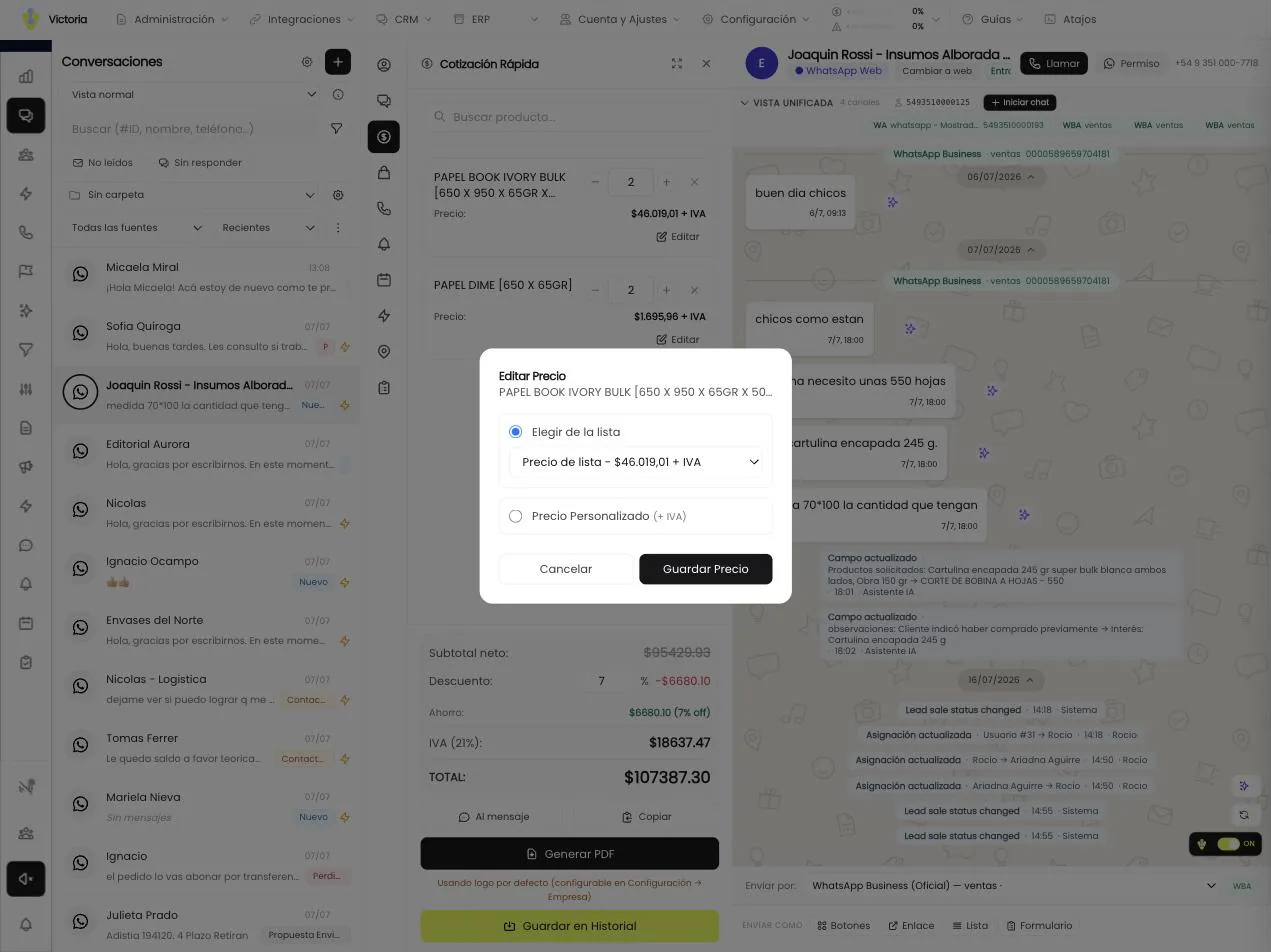
The quote is built with the real catalog and with the price list that matches that customer.

  • Prices per customer type — The system identifies the contact against your ERP by ID, phone, CUIT or legal name, and applies the matching price list. If it cannot identify them, it says so and uses the retail list.
  • Built line by line — A catalog search box, quantity, net price, discount per item or overall, and VAT per line. The total breaks down into net, VAT and total, with the same rounding your ERP uses.
  • Four outputs for the quote — It is inserted as text into the message, copied to the clipboard, generated as a PDF with your company logo or saved to the customer history.
  • It stays tied to the opportunity — When the amount of a quote changes, the system offers to update the linked opportunity. The ones already won or lost stay untouched so the reporting is not distorted.

The PDF carries the legend “This quote is not an invoice and has no tax validity. Prices subject to change without notice.”

app.victoriassistant.com
Victoria CRM: the customer history with their quotes, the detail of each quote and the total
Target and spending

The rep sees their number without asking anyone.

Targets and cash box inside the same system where they work. No parallel spreadsheets.

Target progress is measured with the opportunities won by closing date, the same as the dashboard: the numbers match across screens.

Every rep has their target and their progress visible in the CRM top bar, all the time. When the period closes, the attainment history stays.

  • Targets by amount, by number of sales or by product
  • Weekly, monthly, quarterly or yearly periods
  • An “expected by today” marker on the progress bar
The rest of the day

Everything else, also in plain language.

Reports, reminders and internal coordination inside the same system where the rep works.

  • You write “sales for the last quarter by rep” and the report is built with KPIs, tables and charts
  • You adjust it by asking for changes: “add the VAT column and sort by margin”
  • You save it with a name, run it again and export it to CSV or PDF

AI reports is a module in beta: it builds the report over the real data in the system and it may need an adjustment.

See AI reports
Scope and control

The assistant proposes. The person decides.

This module does not handle customers on its own. It works for the rep who does.

No message is sent on its own

The suggested reply, the autocomplete and the templates write the draft into the text field. Sending is always an action by the rep.

Permissions per role and per screen

The administrator defines what each role sees and can do, screen by screen. There is also the “own records only” scope, which limits the rep to their leads and their data.

Which fields the AI can read and write

Every custom field is configured so the AI can read it, write it or neither. Internal fields stay out of its reach.

Everything is recorded

Every change, every template created and every cash box movement stores an author and a date. The cash box also shows whether the movement came in through AI or through the web.

Team adoption

Get the team using it from week one.

The assistant is useless if the rep keeps working the way they used to. The rollout includes the team.

  1. 01

    Discovery of the sales process

    We map how each role works today: who handles the chat, who quotes, who approves and with which price list.

  2. 02

    Roles and permissions setup

    We define what each profile sees, which fields the AI can read and write, and what requires approval.

  3. 03

    Team training

    We train the reps on their own process, not on generic exercises. It goes live with the templates and the catalog already loaded.

  4. 04

    Adjustment with real usage

    After the start we review what is used and what is not, and adjust templates, fields and targets with the team.

A complete 7-stage process, between 1 and 3 weeks.

See corporate training
Next step

Show us how your team works today.

In 30 minutes we walk through the CRM with your sales process and show you what your team stops entering by hand.

It runs inside Victoria CRM · Available depending on the plan you have.

WhatsApp