
It answers, quotes, collects payment and loads the order.
It replies instantly, 24 hours a day, on all your channels. And it executes the sale inside your ERP, your POS or your management system.
WhatsApp · Instagram · Facebook · TikTok · Twilio calls · WhatsApp calls
One agent that does not change with the channel.
There is no separate bot per app: it is a single agent, with the same instructions and the same customer record in front of it, replying wherever the message came in.
- WhatsAppOn the official WhatsApp Business API
- InstagramYour account’s DMs and the replies to your stories
- FacebookYour Page’s inbox, over Messenger
- TikTokYour TikTok account’s DMs
- Twilio callThe company phone line, to take calls and to make them
- WhatsApp callThe voice call inside WhatsApp itself
Voice calls
The agent takes phone calls and WhatsApp calls: it answers questions, takes the order, quotes and processes the payment out loud. Every call is recorded in the customer chat with its duration, its summary and its transcript.
Telegram, Email, SMS and Webchat are Victoria CRM channels and are handled from the same inbox.
Eleven actions, all inside your systems.
These are not canned replies. They are operations that end up recorded in your ERP and in your CRM.
It qualifies the lead
It asks the key questions, understands the need and classifies the contact in the CRM. It loads the name, the source channel, the history, the products of interest and the stage, without anyone typing a thing.
It loads the customer data
It completes the record with what comes out of the conversation: legal name, CUIT, delivery address, VAT status and any custom fields your CRM has. If the customer already exists, it updates instead of duplicating.
It moves the pipeline
It changes the stage of the opportunity when the conversation warrants it, not when someone remembers: from first contact to quoted, from quoted to closed. The board reflects the real state.
It manages the opportunities
It opens the opportunity, assigns it an amount and products with the prices in your system, marks it won or lost with its reason, and warns the owner when it is about to expire.
It follows up
It goes back to the customer who did not reply, reschedules the contact and leaves the note in the history. Follow-up stops depending on a rep keeping their calendar up to date.
It quotes instantly
It generates a formal quote as a PDF with the company logo, the items, the prices and the terms. Or it sends the prices straight into the message when the question is quick and no document is needed.
It collects payment automatically
It sends a Mercado Pago link or the bank transfer details with an alias or CBU. It verifies the credit and confirms the payment to the customer with nobody stepping in.
It loads the order into your system
When the payment is confirmed, it records the order in the ERP, the POS or the management system, with the items, the quantities and the prices from the conversation.
It coordinates the shipment
It requests the shipment from PuniYa or another delivery platform as soon as the order is closed. Nobody in the business calls the courier or confirms times by hand.
It books appointments on the real calendar
It looks for free slots, books, reschedules, cancels and confirms attendance against the real availability of each professional — not against a parallel calendar. The front desk sees the same calendar in the CRM. It is switched on per company: if it is off, the agent does not offer appointments.
It hands off to the human rep
When the enquiry calls for it, it escalates to the right rep inside the CRM with the whole conversation loaded and the opportunity already open.
The agent speaks with the tone and the identity of your company: it is trained on the way you communicate and on the full catalog.
See how it is trainedThe lead comes in and loads itself.
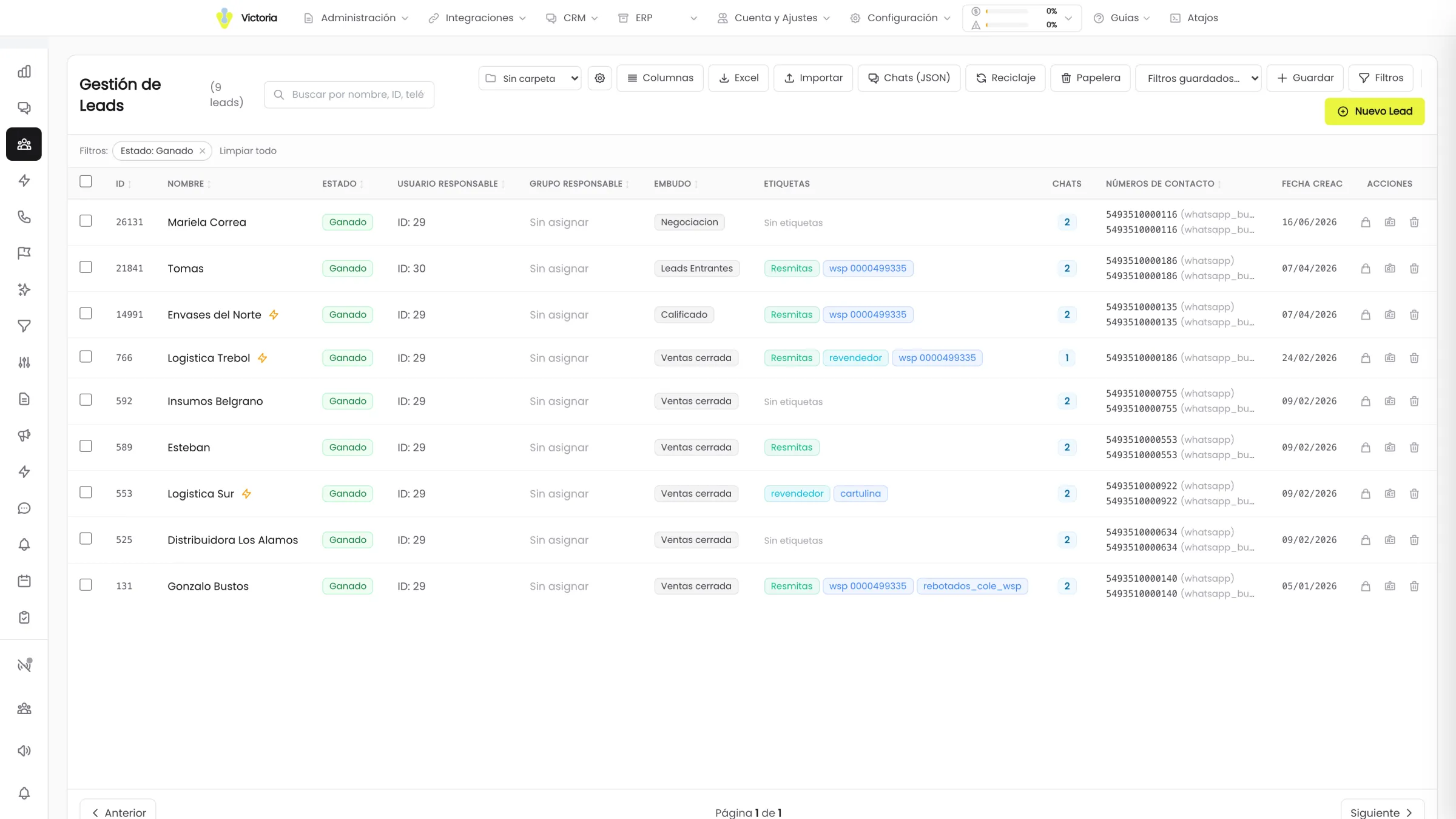
Every new conversation turns into a CRM lead with its source channel, its pipeline, its stage and its owner. The team opens the list and it is already filled in.
- Name, channel, history and products of interest
- Pipeline stage and tags assigned by the agent
- Owner or owning group according to your rules
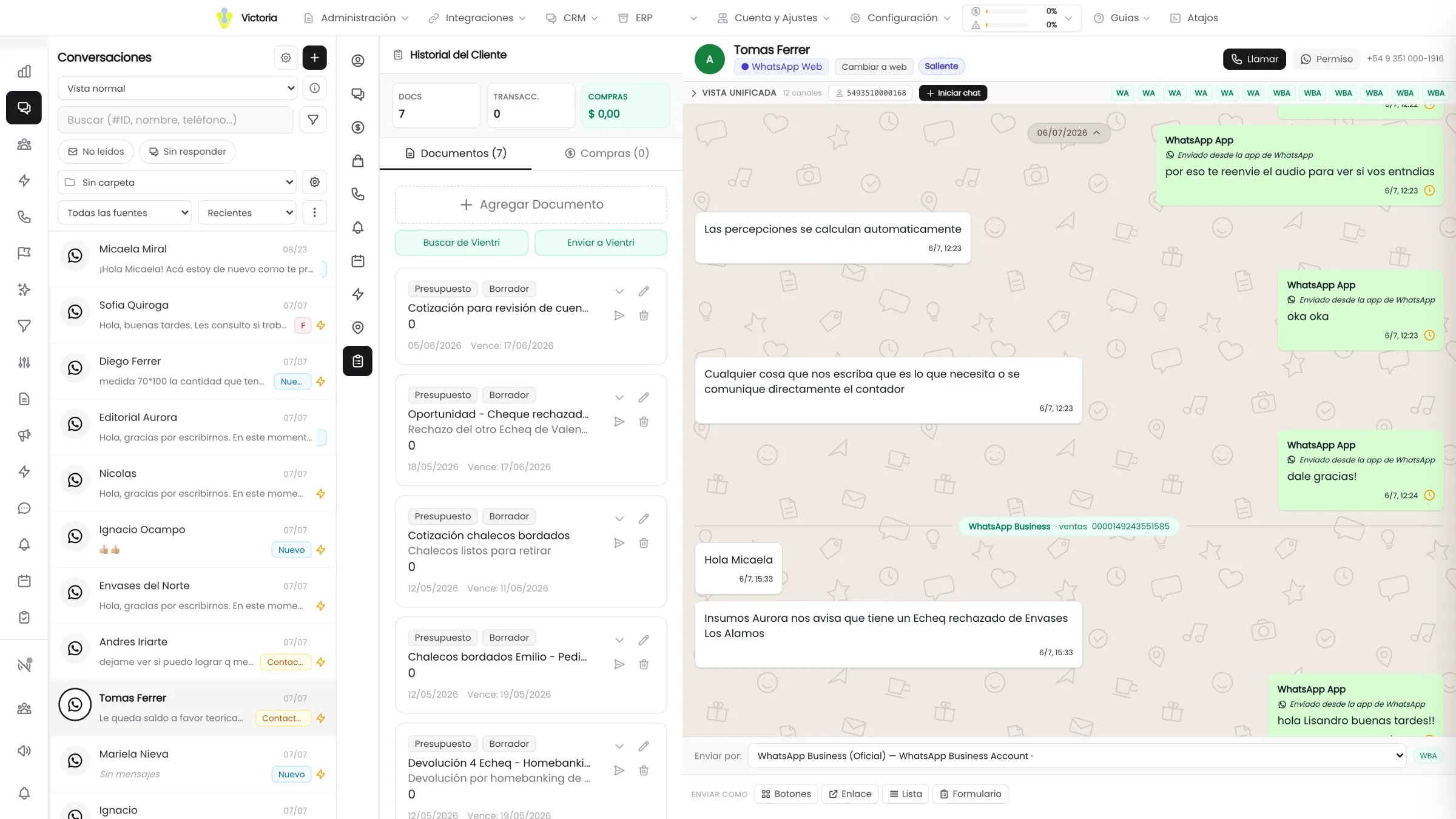
The quote and the opportunity end up written down.
The agent builds the quote with the price list that matches the customer and attaches it to their record, along with the opportunity it opened in the pipeline.
- A quote document with its items and its total
- An opportunity created by the agent, with time and author
- The customer history with documents and purchases in view
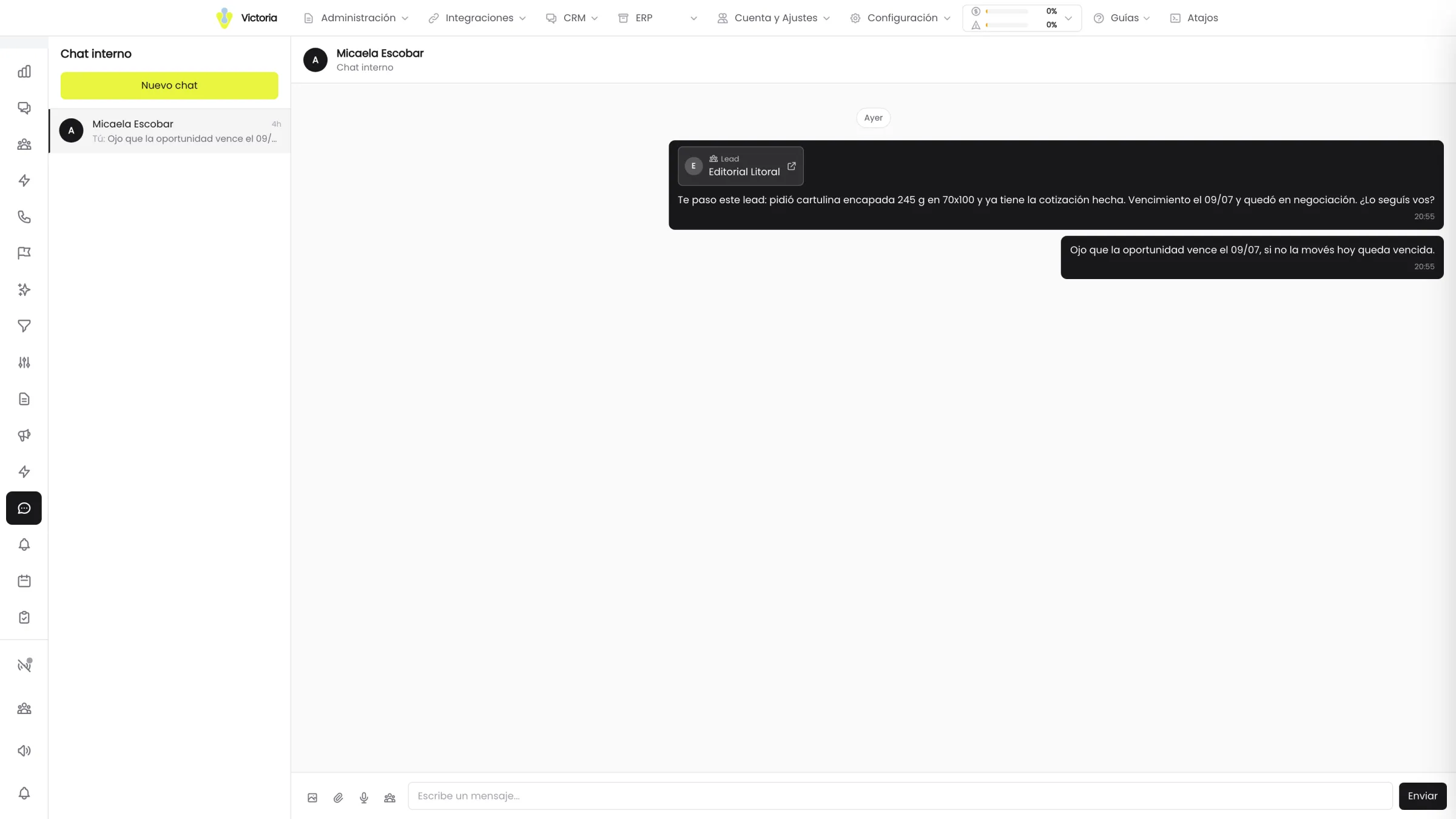
The handoff arrives with the case inside.
When the case needs a person, the rep receives it in the team internal chat with the lead record attached. They walk in knowing what happened, not asking again.
- Internal chat between the CRM users
- The lead record attached, with direct access to the conversation
- The opportunity is already open when the person walks in
This is not a reply. It is a sale executed.
A conversation from start to finish. Every lime card is an action that ended up recorded in the system.
- Lead and opportunity in the CRM
- Payment confirmed
- Order in the ERP
- Shipment coordinated
- Hi, I need 20 boxes of the 5-litre oil. Can you send me a price?
- Hi Martín. We have the 20 boxes in stock. I will put the quote together with your price list and send it now.Victoria
- Lead loaded into the CRM · Opportunity openedDistribuidora del Centro · WhatsApp channel
- Quote #104220 boxes · Valid for 7 days · PDFVictoria
- Perfect, I will take it. How do I pay?
- Here is the Mercado Pago link. You can also transfer to the alias distribuidora.centro.Victoria
- Done, I just transferred.
- Confirmed, Martín. We received the payment and loaded your order. We are dispatching it today.Victoria
- Payment credited · Automatic confirmationTransfer verified
- Order #4821 loaded into the ERP20 boxes · prices from the conversation
- Shipment requested from PuniYaSame-day dispatch
- Lead and opportunity in the CRMWaiting
- Payment confirmedWaiting
- Order in the ERPWaiting
- Shipment coordinatedWaiting
A simulation with fictional data. The flow, the channels and the actions are the same ones the agent executes in production.
Eight steps, with nobody stepping in.
From the first message to the order loaded into the system and the shipment coordinated.
- 01
The lead comes in
Through WhatsApp, Instagram, Facebook, TikTok, a Twilio call or a WhatsApp call.
- 02
It replies without waiting
The agent replies instantly, whether the team is busy or it is the middle of the night.
- 03
It qualifies the lead
It asks the key questions and fills in every contact field in the CRM.
- 04
It quotes
A formal quote as a PDF or prices straight into the message, depending on the context.
- 05
It collects payment
A Mercado Pago link or bank transfer details, inside the conversation.
- 06
Payment confirmed
The payment is verified on its own and the customer gets an automatic confirmation.
- 07
Order into the system
It is recorded in the ERP, the POS or the management system with its items and prices.
- 08
It coordinates the shipment
The shipment is requested from PuniYa or another delivery platform, with no calls and no spreadsheets.
Every step is recorded in the CRM with its time, its channel and its owner.
It collects, records and ships inside your own infrastructure.
The agent does not store the sale in a parallel system. It writes it where your company already works.
Payments
Mercado Pago with a payment link and automatic verification of the credit, and bank transfer with an alias or CBU and automatic confirmation. All inside the conversation, without the customer switching apps.
ERP, POS or management system
A native, bidirectional integration. When the payment is confirmed, the order is recorded as a quote, a delivery note or whichever document applies. The prices and the stock are always read from your system.
Shipping
PuniYa is integrated and switched on from day one. PedidosYa is in progress. If you use another platform or your own fleet, the connection is built around how your business operates.
- PaymentsMercado PagoAvailable
- PaymentsBank transferAvailable
- Management systemERP, POS or in-house systemCustom-built
- DeliveryPuniYaAvailable
- DeliveryPedidosYaIn progress
Compatible with any ERP: if the integration does not exist, we build it.
See all the integrationsHow far the agent goes is your call.
Saying where the limit is, is part of the offer. The agent does what the company decides it should do, and nothing else.
Your company defines the scope
The agent executes every action we give it tools for: quote, collect payment, load the order, coordinate the shipment, modify or cancel. The more access it has to your system, the more it resolves end to end. You decide how far it goes.
Approvals configurable action by action
When the agent wants to create, modify, change the status of or delete an opportunity, the proposal can wait for approval. It is configured per action type, not all or nothing.
Rules by time of day and by owner
Approvals allow exceptions per time slot and per day. You also define what happens if the lead has no owner: ask for confirmation, assign in rotation or apply it directly.
Handoff with the full context
When the case needs a person, the agent escalates to the right rep with the whole conversation loaded and the opportunity open. The person walks in knowing what happened, not asking again.
Every agent action and every approval is audited inside the platform, with author and date.
See security and dataIt learns to sell like your best sales rep.
The agent does not go into production until it replies the way you expect. Between 1 and 3 weeks.
- 01
Personality and business discovery
You fill in a form with the tone, the communication style and the rules of your company. That is what defines how the agent speaks.
- 02
Training
We load the full catalog, the price lists, the sales flows and the integration with the ERP or POS. We define which actions require human approval.
- 03
Testing and adjustments
We deliver a test version, your team uses it with real cases and we apply the changes until the agent replies the way it should.
- 04
Launch and support
It goes into production on every configured channel and operates 24/7. After that we keep adjusting flows, answers and scope with your team.
A complete 7-stage process, between 1 and 3 weeks.
See the full processThe agent does not work alone.
Let’s see the agent with your catalog.
In 30 minutes we review your channels, your management system and the way you quote, and we show you what the agent would do in your operation.
Rollout in 1 to 3 weeks · Without changing the system you already use.